Car Rental Software Was Not Built for a Week-Long Trip
Most car rental software assumes a booking that lasts a day or two, prices by a flat daily rate, and closes out with a quick fuel and mileage check. RV and motorhome rentals break every one of those assumptions. Trips run five, ten, sometimes fourteen days. Pricing shifts by season. And the vehicle itself comes with a generator, a mileage allowance, and a deposit that is a serious number, not an afterthought.
Operators who start on generic car rental software usually notice the gap within the first season: seasonal rates get quoted by hand in email, generator hours get tracked on a whiteboard, and deposits get collected over the phone because the checkout flow was never built to hold one. This guide covers what RV rental software actually needs to do, the features that matter most, and the ones borrowed from day-rental car software that you can safely ignore.
What RV Rental Software Actually Needs to Do
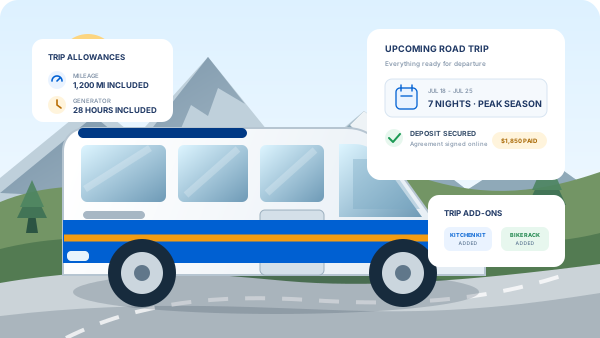
RV rental software has to organize a booking around a longer, higher-value trip instead of a short one. In practice that means RV and motorhome rental software earns its keep on a small set of specifics: multi-day and seasonal pricing tiers, mileage and generator-hour tracking with automatic overage billing, paid equipment add-ons selected at checkout, online deposits and prep fees, and real-time availability tracked per unit rather than per vehicle class.
None of that is exotic — it is the same reservation logic every rental platform already runs, applied to a trip that lasts a week instead of a day and a vehicle that costs more to protect. The difference shows up in the details: a booking engine that only supports a single daily rate simply cannot quote a two-week trip correctly, and a checkout that does not support a real deposit forces the conversation back to the phone.
The Five Features That Matter Most
1. Multi-day, weekly, and seasonal pricing tiers
Rates need to step down for longer stays and shift for peak travel months, calculated automatically at booking rather than quoted manually. A traveler should see an accurate weekly or seasonal total before they ever contact the office.
2. Mileage and generator-hour tracking with overage billing
Capture the odometer and generator-hour readings at both check-out and check-in, and bill any overage automatically at return. This is the single feature most responsible for turning a fuzzy verbal agreement into a number both sides can see.
3. Paid equipment add-ons at checkout
Kitchen kits, bedding, bike or kayak racks, and camping gear should be selectable and paid for during booking, not negotiated at pickup. Since add-ons commonly make up a fifth or more of total revenue on a trip, moving them into checkout is a direct revenue lever, not just a convenience.
4. Online deposits and prep fees
A deposit large enough to matter needs a payment flow that can actually hold it — collected online at booking, not requested at the counter. This protects the operator on higher-value units and removes a pickup-day bottleneck at the same time.
5. Real-time availability by individual unit
With a smaller fleet of expensive, non-interchangeable vehicles, availability has to be tracked unit by unit rather than by a generic vehicle class, the same way our own availability engine handles it. Double-booking a motorhome is a far more expensive mistake than double-booking an economy sedan.
Two features you can skip: hourly rental rates and same-day turnaround optimization. Both are staples of short-term car rental software, and neither applies to a trip measured in days or weeks. If a platform's pricing engine is built around hourly rates first, it was designed for a different business.
"An RV booking is a car rental with a longer trip, a bigger deposit, and a generator attached. The software difference is entirely in how it prices and protects those three things."
One Platform, or a Separate RV Booking Tool?
Operators who add RVs or motorhomes alongside an existing car fleet often start by looking at RV-only booking tools built specifically for that niche. It's a reasonable instinct — the pricing and add-on logic above is specialized — but it usually means running two calendars, two logins, and two customer databases that don't talk to each other. A guest who books a sedan one month and a motorhome the next shows up as two unrelated records instead of one.
A platform that handles both car and RV inventory in the same reservation engine keeps availability, deposits, and customer history in a single place. It's the same trade-off this site's own guide to fleet management software makes about standalone fleet tools: the real cost of a second system isn't the subscription, it's the gap between two records of the same customer and the same calendar.
The exception is an operation that rents exclusively RVs at real scale and needs logistics a general rental platform doesn't offer — deep campground-network integrations, for instance. For most independent operators adding RVs to a mixed fleet, or starting focused on RVs and motorhomes without that scale yet, one integrated platform removes more friction than a specialized add-on tool solves.
Setting It Up in 5 Steps
-
1
Build your rate tiers
Set daily, weekly, and custom multi-day rates per unit or class, then layer seasonal pricing for peak travel months so quotes calculate automatically.
-
2
Set mileage and generator allowances
Define the included mileage and generator hours per booking length, and set the overage rate that bills automatically at return.
-
3
Load your add-on inventory
List kitchen kits, bedding, racks, and camping gear as paid extras travelers can select and pay for during checkout.
-
4
Turn on online deposits
Configure the deposit and any prep or cleaning fee to collect online at the time of booking, sized to the value of each unit.
-
5
Run check-out and check-in inspections digitally
Capture photos, mileage, and generator hours at both ends of every trip so condition and usage are documented, not disputed.
What Changes When the Software Fits the Trip
Quotes stop requiring a phone call
Travelers see an accurate weekly or seasonal price and book directly, instead of emailing for a manual quote on a multi-day stay.
Generator and mileage overages get captured, not forgotten
Readings taken at both ends of the trip turn a usage allowance into billed revenue instead of a number nobody wrote down.
Add-ons turn into booked revenue instead of counter upsells
Equipment selected and paid for at checkout shows up in the total before the trip starts, rather than depending on a conversation at pickup.
Deposits stop being a pickup-day bottleneck
Collected online at booking, a deposit sized to the unit's value protects the business without holding up the counter on travel day.
A five-unit fleet scales without new admin work
Unit-level availability, automated pricing, and digital inspections mean adding vehicles doesn't mean adding another person to manage the spreadsheet.
Frequently Asked Questions
Technically yes, but most car rental platforms assume day-or-two rentals with a flat daily rate, which breaks down fast for RVs. You end up quoting weekly and seasonal rates by hand, tracking generator hours in a spreadsheet, and chasing deposits over the phone. A platform built to support multi-day pricing tiers, usage-based overages, and larger deposits handles the same booking without the manual workarounds.
For most operators, yes. RV and motorhome rentals commonly include a mileage allowance and generator-hour allowance in the base rate, with overages billed at return. Software that captures both readings at check-in and check-out and calculates the overage automatically removes a common source of billing disputes and missed revenue.
Motorhome and larger-trailer deposits are often several hundred dollars or more, so collecting them by cash or check on pickup day is both a liability and a bottleneck. Software that takes deposits and prep or cleaning fees online at booking protects higher-value units before the traveler ever arrives.
Kitchen kits, bedding packages, bike or kayak racks, generators, and camping gear are common paid add-ons in RV rentals and frequently account for a meaningful share of a booking's total revenue. Software should let travelers select and pay for add-ons during checkout rather than negotiating them at the counter.
No, but it should include them. Larger, higher-value units make photo-documented check-out and check-in condition reports more important, not less, since damage claims on a motorhome or travel trailer are typically far more expensive to dispute without evidence than on a sedan.