You Can't Fix a Booking Funnel You Can't See
Your website gets visitors — the hosting bill proves it. Some of them book, most don't, and if someone asked you where the non-bookers gave up, could you answer? At the search widget? On the results page? At payment? For most independent rental operators, the honest answer is a shrug — and every marketing decision built on that shrug is a guess.
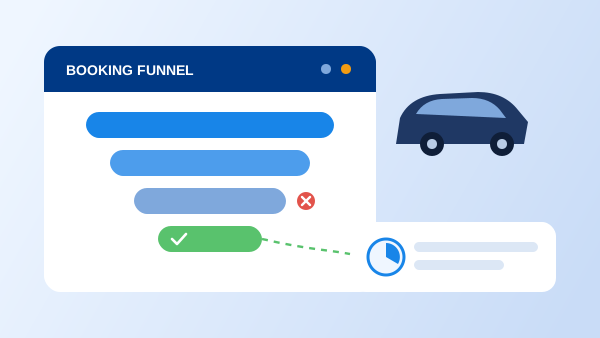
Conversion tracking replaces the shrug with numbers. It tells you how many visitors started a search, how many saw cars, how many reached checkout, and how many actually reserved — and which ad, email, or Google result sent the ones who did. With that picture, "improve the website" stops being a vague ambition and becomes a specific repair: fix the step where the most people leave.
This guide covers what counts as a conversion on a rental site, the booking funnel and its usual leaks, and a five-step setup using Google Analytics 4 that doesn't require a developer on staff.
What Counts as a Conversion on a Rental Website
The obvious answer is a completed reservation, and that is your primary conversion. But a rental business closes deals through more doors than the checkout page, so track the secondary conversions too:
- Quote/search started — a visitor entered dates and locations in the booking widget. This is the top of your funnel and your strongest signal of intent.
- Phone click — on mobile, a tap on your phone number. Many rentals, especially high-value ones, still close by phone after starting online.
- WhatsApp/chat opened — same logic; a chat started from the site is a lead your team can convert.
- Contact or demo form sent — for corporate accounts and long-term rentals that never touch the standard checkout.
All of these depend on having a real-time booking engine on your website in the first place — if visitors can only "request a quote" by email, your funnel starts leaking at step one. (New to the concept? Start with our explainer on what a booking engine is.)
The Rental Booking Funnel — and Where It Leaks
Step 1: The search widget
If the date/location search isn't visible without scrolling on both desktop and mobile, a share of visitors never begins. This is the cheapest leak to fix and the most commonly ignored.
Step 2: The results page
Visitors abandon results that load slowly, show cars without total prices, or hide availability behind another click. Clear totals — including fees — at this step prevent the nasty surprise that kills checkouts later.
Step 3: Extras and options
A long wall of upsells before the customer has committed is a classic drop-off point. Keep the path to "reserve" short; sell extras once the booking momentum exists.
Step 4: Details and payment
Forced account creation, forms that re-ask known information, and payment that fails on mobile are the heavyweight leaks. Checkout abandonment here is rarely about price — the customer already saw the price at results.
"Doubling your conversion rate has the same effect on bookings as doubling your traffic — and it's almost always cheaper."
Set Up Conversion Tracking in 5 Steps
The following assumes Google Analytics 4, since it's free and near-universal, but the logic applies to any analytics tool:
-
1
Define your conversion events on paper first
List the actions worth counting: booking completed, search started, phone click, chat opened, form sent. Give each a clear name before touching any tool — naming chaos is the number one reason tracking setups become unreadable.
-
2
Install GA4 site-wide, respecting consent
Add the GA4 tag to every page, including every step of the booking flow, and wire it to your cookie-consent banner so tracking honors visitor choices in GDPR and similar jurisdictions.
-
3
Tag each funnel step as an event
Fire an event at search, results, checkout start, and the confirmation page. The confirmation-page event is your completed booking — mark it as a key event in GA4. If your booking engine runs on a separate domain, configure cross-domain tracking so the funnel doesn't break mid-journey.
-
4
Label your traffic sources
Add UTM parameters to every campaign link — ads, newsletters, social posts, partner sites. Without them, bookings pile up under "direct" and you can't tell which spend is working.
-
5
Review monthly and fix the biggest leak
Build a simple funnel report: visitors → searches → results → checkout → booked. Find the step with the worst drop-off, form one hypothesis, change one thing, and compare next month. That loop is the entire discipline.
What Changes Once You Can See the Funnel
Marketing spend follows evidence
When each booking carries its source, you stop paying for channels that send window-shoppers and double down on the ones that send renters. One month of tracked data routinely reallocates budgets.
Website changes become testable
New homepage layout, new photos, new pricing display — each change either moved the funnel numbers or it didn't. Opinions leave the meeting; before-and-after data replaces them.
You recover almost-bookings
Visitors who searched but didn't book are your warmest audience. Knowing how many exist — and where they stopped — justifies follow-up tactics like retargeting or a simpler checkout.
Seasonal planning gets a leading indicator
Search volume on your own site rises weeks before bookings do. Watching searches per week tells you demand is building — useful input for the pricing decisions in our dynamic pricing guide.
Multilingual pages prove their worth
If you serve international renters from a multilingual rental website, per-language funnel data shows whether your Spanish or French pages convert as well as your English ones — and where translations or local payment options need work.
The Takeaway
Conversion tracking for a car rental website is four decisions and an hour of setup: define the events that matter, install analytics with consent, tag the booking funnel's steps, and label your traffic. From then on, once a month, fix the biggest leak the data shows you. It's unglamorous, and it compounds — because every percentage point of conversion you win is bookings from traffic you were already paying for.
Tracking tells you which bookings you won. Converting more of them depends on what sits behind the form — live availability, instant confirmation, and rates that are always current, which is what a car rental software platform provides.
Frequently Asked Questions
The primary conversion is a completed reservation. But a rental site has valuable secondary conversions too: a quote or availability search started, a phone number tapped, a WhatsApp chat opened, and a contact form sent — many rentals still close over the phone after starting online. Track the primary and secondary conversions separately so you can see both how many bookings you get and how many almost-bookings you could recover.
Most travel and rental sites convert somewhere in the low single digits — commonly cited benchmarks fall around 1–4% of visitors completing a booking, with big differences by market, season, and traffic source. Treat published numbers as rough context only. The more useful benchmark is your own: measure this month's rate, fix the biggest leak in the funnel, and compare next month.
You need two layers. Your reservation system already records every completed booking — that's your source of truth for revenue. An analytics tool like GA4 adds what the reservation system can't see: how many visitors never started a search, which step of the booking flow they abandoned, and which traffic source sent the people who actually booked. The two together turn 'we got 40 bookings' into 'we got 40 bookings from 2,000 visitors, and most drop-offs happen at the payment step.'
In practice the biggest leaks are: a search widget that isn't immediately visible on the homepage, results pages that show cars without clear total prices, surprise fees appearing at checkout, forced account creation, and payment steps that fail on mobile. Funnel tracking tells you which of these is your leak — the fix for a weak results page is very different from the fix for checkout abandonment.
You'll see event counts within a day, but wait for a meaningful sample before acting — for most independent rental sites that means 2–4 weeks of data, longer if traffic is low. Avoid reacting to single-day swings. A monthly review cycle is the practical rhythm: enough data to spot a real pattern, frequent enough to fix problems within the season.