What the Booking API Does
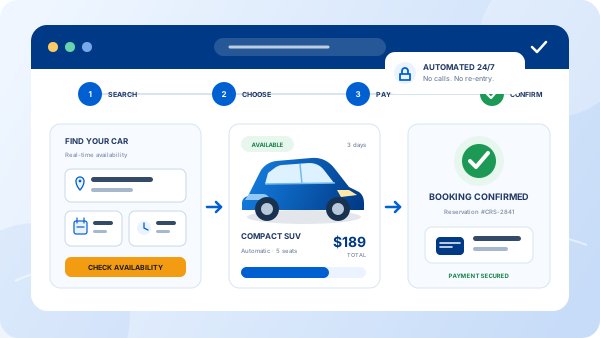
The Car Rental Solutions API is a REST API for one rental company’s own fleet. A website, app or partner system uses it to list the agency’s locations, price its vehicles live and create reservations. Those reservations land in the same control panel as counter and phone bookings, on one availability calendar.
It is not an aggregator API. Travel-industry car APIs let a travel site resell inventory from many rental brands. This API does a different job: it lets an independent agency, or the developer it hires, sell the agency’s own cars on its own website. If you are the agency owner rather than the developer, start with our car rental API integration guide or the API overview, then send this page to whoever builds your site.
Before You Start
- Reference and spec. The interactive reference is at app.carrentalsolutions.com, and the OpenAPI document is at
/openapi/v1.json. Endpoints live under/api/v1/onhttps://app.carrentalsolutions.com. - An API key. Every request carries
Authorization: Bearer YOUR_API_KEY. A key belongs to one rental company’s account, so every call returns that company’s locations, vehicles and rates. If you are building for an agency, get the key from the agency. If you are the agency, ask our team. - A server-side proxy. Never put the key in browser JavaScript, where anyone can read it. Have your booking form call your own endpoint (a small server route or serverless function), and let that endpoint add the header and forward the request.
The Endpoints at a Glance
| Call | Use it for |
|---|---|
GET /api/v1/locations | Pickup locations, and which drop-off locations each one allows |
GET /api/v1/age-groups | Driver age groups, which pricing depends on |
GET /api/v1/countries | Country IDs for the customer’s address |
GET /api/v1/groups | The top-level vehicle group shown on the home page, with live prices on request |
GET /api/v1/groups/{groupId} | One group’s child groups and vehicles |
GET /api/v1/vehicles/{vehicleId} | One vehicle, its extras, an itemized quote and a pricing token |
POST /api/v1/reservations | Create the reservation |
GET /api/v1/reservations/{reservationId} | Read a reservation back, with the customer’s email |
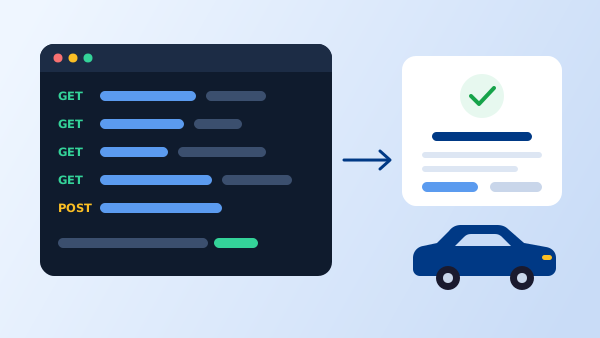
The Booking Flow in Five Calls
The examples use curl so they work in any language. IDs such as MIA, AG25 and ECAR-01 are placeholders; use the IDs the API returns for your account.
1. Load locations, age groups and countries
These change rarely, so load them once when the booking form opens and cache them. Each location lists the drop-off locations it allows in dropoffs; use it to limit the drop-off menu so customers can’t pick a one-way trip the agency doesn’t offer.
curl https://app.carrentalsolutions.com/api/v1/locations \
  --header 'Authorization: Bearer YOUR_API_KEY'
Response (shortened, illustrative values)
{
  "items": [
    { "id": "MIA", "name": "Miami Airport", "group": null, "dropoffs": ["MIA", "FLL"] }
  ],
  "_links": { "self": "...", "prev": null, "next": null }
}
Lists come with _links. If next is not null, follow it to get the rest. /age-groups and /countries work the same way and return id and name for each item.
2. Search the fleet with live prices
Request the top-level group with include=prices. Pricing needs a pickup location, a start, an end and an age group. The drop-off location defaults to the pickup location for a round trip; rateCode defaults to the standard website rate, and coupon is optional.
curl -G https://app.carrentalsolutions.com/api/v1/groups \
  --header 'Authorization: Bearer YOUR_API_KEY' \
  --data-urlencode 'include=prices' \
  --data-urlencode 'pickupId=MIA' \
  --data-urlencode 'start=2026-11-20T10:00:00' \
  --data-urlencode 'end=2026-11-23T10:00:00' \
  --data-urlencode 'ageGroupId=AG25'
The response holds vehicles, each with a prices list (chargeId, rate, suffix), and child groups you can open with GET /api/v1/groups/{groupId} using the same parameters. The group and each vehicle can also carry _errors and _warnings. Show those messages to the customer instead of dropping the vehicle silently.
3. Quote one vehicle and get the pricing token
When the customer picks a car, request it with the same parameters, plus any extras. Pass extra once per add-on, as code or code:quantity.
curl -G https://app.carrentalsolutions.com/api/v1/vehicles/ECAR-01 \
  --header 'Authorization: Bearer YOUR_API_KEY' \
  --data-urlencode 'include=prices' \
  --data-urlencode 'pickupId=MIA' \
  --data-urlencode 'start=2026-11-20T10:00:00' \
  --data-urlencode 'end=2026-11-23T10:00:00' \
  --data-urlencode 'ageGroupId=AG25' \
  --data-urlencode 'extra=child-seat:1'
Response fields you will use
{
  "id": "ECAR-01",
  "name": "...",
  "extras": [ { "chargeId": "...", "title": "...", "maximumQuantity": 2, "rate": 0, "subtotal": 0, "suffix": "..." } ],
  "quote":  [ { "chargeId": "...", "title": "...", "quantity": 3, "rate": 0, "subtotal": 0, "suffix": "..." } ],
  "pricingToken": "...",
  "otherChoices": [ { "id": "...", "name": "..." } ],
  "_links": { "self": "...", "createReservation": "..." }
}
quote is the itemized price. Display it line by line as the API returns it, and don’t recalculate totals in your own code. extras lists the add-ons available for this vehicle, with a maximumQuantity to respect in your form. otherChoices offers similar vehicles if the customer wants an alternative.
4. Create the reservation
Send the pricing token back with the exact parameters you quoted with, the quote lines and the customer. customer needs firstName, lastName, email and countryId (from step 1); phone and comments are optional.
curl https://app.carrentalsolutions.com/api/v1/reservations \
  --header 'Authorization: Bearer YOUR_API_KEY' \
  --header 'Content-Type: application/json' \
  --data '{
    "pricingToken": "TOKEN_FROM_STEP_3",
    "vehicleId": "ECAR-01",
    "pickupId": "MIA",
    "start": "2026-11-20T10:00:00",
    "end": "2026-11-23T10:00:00",
    "ageGroupId": "AG25",
    "quote": [ { "chargeId": "...", "quantity": 3, "rate": 0, "subtotal": 0 } ],
    "customer": {
      "firstName": "Ana", "lastName": "Lopez",
      "email": "ana@example.com", "phone": "+1 305 555 0100",
      "countryId": "US"
    },
    "comments": "Arriving on an evening flight"
  }'
On success, the Location response header points to the new reservation.
5. Read the reservation back
Reading a reservation requires its ID and the customer’s email, so one customer can’t look up another’s booking by guessing IDs. IDs look like ABC-10293: the agency’s prefix and a code.
curl -G https://app.carrentalsolutions.com/api/v1/reservations/ABC-10293 \
  --header 'Authorization: Bearer YOUR_API_KEY' \
  --data-urlencode 'email=ana@example.com'
The response has the customer, vehicle, dates, locations, amounts owed and paid, and the itemized quote. Build the confirmation page from it rather than from what your form remembers.
The Pricing Token Rule
This is the part integrations most often get wrong. The token from step 3 guarantees that the price the customer saw hasn’t changed. It is only valid if these fields are sent back exactly as they were in that call:
| Must match the quote call | What that means in practice |
|---|---|
vehicleId | The car the customer quoted, not a substitute |
pickupId, dropoffId | Send dropoffId only if you sent it when quoting |
start, end | The same strings, not reformatted or converted to another time zone |
ageGroupId, rateCode, coupon | Unchanged since the quote |
quote | The quote lines from the same call |
- Store the quote request and response together on your server for the customer’s session.
- Re-quote on any change. If the customer edits dates or extras, call step 3 again and use the new token.
- Never rebook silently at a new price. If the reservation is rejected, request a new quote, show the new price and let the customer confirm it.
Launch Checklist
- The API key lives only on the server, and the browser calls your proxy.
- Locations, age groups and countries are cached. Prices are never cached.
- The drop-off menu only offers the locations listed in
dropoffs. - The form asks for the driver’s age group before showing prices, since pricing requires it.
_errorsand_warningsare shown to the customer.- The quote is displayed line by line from the API, and totals are not recalculated.
- Test bookings cover a round trip, a one-way trip, a young driver, extras and a coupon, and each one is checked in the control panel.
- Completed bookings are tracked as conversions. Our guide to conversion tracking for rental websites covers the setup.
Who Builds With It
Rental agencies with their own website
Agencies that already have a site they like add a custom booking flow to it, keeping their design and search rankings. Agencies that don’t want any development can generate a complete site or a ready-made booking engine from the Integrations section instead, as described on the API overview page.
Web developers and agencies
Developers who build sites for rental clients use the API to make the booking flow match the rest of the site, in any framework or language. One integration pattern works for every client on Car Rental Solutions; only the API key changes.
Partners
Businesses that send travelers to a rental agency, such as hotels, tour operators and travel sites, can show that agency’s cars and take bookings on their own pages using a key the agency provides. If you want to build a partner integration, contact us.
Frequently Asked Questions
Yes. The Car Rental Solutions API is a REST API for one rental company's own locations, vehicles and rates. A website or partner system uses it to price vehicles live and create reservations that land in the agency's control panel. It is different from travel-industry car APIs, which resell many rental brands' inventory to travel sites.
Send the API key as a bearer token in the Authorization header of every request. Each key belongs to one rental company's account, so every call returns that company's locations, fleet and rates.
No. Anyone can read a key that ships to the browser. Keep the key on a server or serverless function, have the browser call that endpoint, and let it add the Authorization header before forwarding the request.
The interactive reference is at app.carrentalsolutions.com and the OpenAPI 3.1 document is at app.carrentalsolutions.com/openapi/v1.json, with a YAML download in the reference. You can generate a client from it, and the reference shows request examples in Shell, Node.js, Python, PHP and Ruby.
The most common cause is the pricing token. It is only valid if the vehicle, pickup and drop-off locations, start and end, age group, rate code, coupon and quote lines are sent back exactly as they were in the quote call. If any of them changed, request a new quote, show the customer the new price and then book.