
Software & Technology
Best Rental Management Software: 9 Features That Actually Matter
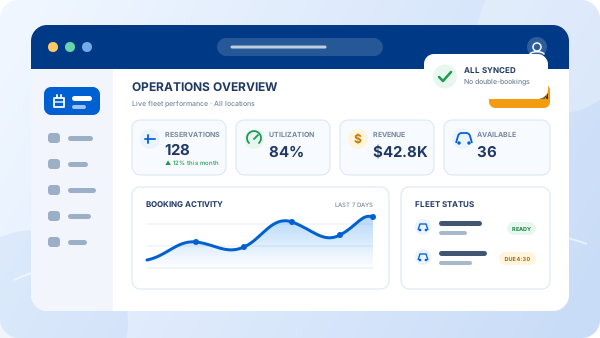
Search for the best rental management software and you'll find a wall of nearly identical promises. Meanwhile, the real question is simpler: which features will actually capture more bookings, prevent double-rentals, and cut hours of admin from your week? After years of building software for rental operators, here is the checklist that separates purpose-built platforms from repackaged generic tools.
What rental management software must actually cover
True car rental management software runs the entire rental lifecycle: quote, reservation, payment, signed agreement, vehicle out, vehicle back, and reporting—in one system. If a product only handles one slice (just bookings, or just fleet), you will spend your margin stitching tools together and re-typing data between them.
The 9 features that matter
1. Real-time availability that can't double-book
The system must know, at all times, which vehicles are on rent, reserved, or in maintenance—and reflect it instantly on your website. Double bookings destroy customer trust faster than any marketing can repair.
2. A rental-specific rate engine
Seasons, weekend rates, weekly and monthly tiers, age-based fees, one-way charges, extras like GPS and child seats. Generic calendars cannot price these. Your software should calculate the right total automatically, every time—including rates that span two seasons.
3. An integrated booking website
Your website and your back office should be one system, not a plugin bolted to a template. When they're integrated, every quote is accurate and every booking lands in your control panel without re-entry—your site becomes a 24/7 reservation system.
4. E-sign rental agreements
Reservations should convert to signed contracts in minutes, not paper piles. Electronic signatures speed up the counter, reduce disputes, and keep every agreement searchable.
5. Fleet and maintenance tracking
Mileage, damage notes, service schedules, and out-of-service flags belong next to your reservations, so a car due for service is never rentable by mistake. That's the core of fleet management done right.
6. Multi-location control
If you operate more than one branch—or plan to—the software must handle per-location fleets, rates, and availability with consolidated reporting, not separate accounts taped together.
7. Multilingual and multi-currency booking
Tourist markets book in their own language. A multilingual reservation website quietly wins the international customers your competitors turn away.
8. Reports you'll actually use
Utilization, revenue per vehicle, upcoming returns, outstanding balances. If you can't answer "which vehicles earn their keep?" in two clicks, the reporting isn't done.
9. Fast onboarding and real support
The best software is the one your team actually uses. Look for personalized onboarding, training included, and a realistic go-live measured in days—not months of setup fees.
How to evaluate the options: 6 steps
- List your rules. Write down every pricing rule, fee, and season you use today. This list will disqualify generic tools fast.
- Demo with your own scenario. Bring a real quote—a 10-day cross-season rental with a young driver and extras—and watch the system price it.
- Test the customer's side. Book a car on the vendor's demo website from your phone, in a second language if you serve tourists.
- Check the full lifecycle. Follow one booking from quote to signed agreement to return. Count the manual steps.
- Ask about go-live. Get a concrete timeline and what's included: website, data setup, training.
- Compare total cost against captured revenue. A few after-hours bookings per month usually pays for the software outright.
See all 9 features in one platform
Website, reservations, pricing, e-sign contracts, and fleet—purpose-built for rental agencies, live in about 5 days.
Explore the features Start 14-day free trialRed flags to walk away from
Be cautious with any product that can't show real-time availability on your own website, charges "customization fees" to handle basic rental pricing, has no rental agreement or e-sign step, or can't name recent product updates. Software that isn't improving is quietly being retired.
The takeaway
The best rental management software isn't the one with the longest feature list—it's the one purpose-built for how rentals actually work, that your team can run without a manual. Use the 9-point checklist above, demo with your own numbers, and if you're starting your search, our guide on how to choose car rental software walks through the decision process step by step.
Rental management software FAQs
Isn't generic booking software enough for a small rental agency?
Generic booking tools don't understand rental realities: seasonal rates, age surcharges, one-way fees, security deposits, or vehicle turnaround time. Most agencies that start with a generic tool end up rebuilding their process within a year. Purpose-built rental management software handles these rules automatically from day one.
How much does rental management software cost?
Pricing models vary from monthly subscriptions to per-booking fees. What matters is total cost against captured revenue: a system that wins you a handful of after-hours bookings each month typically pays for itself. See our pricing page for current plans.
Should I choose cloud-based or installed software?
Cloud-based (web-based) systems are the standard today. Your team can work from any authorized device, updates and backups are handled for you, and there's no server hardware to maintain.
How long does it take to implement rental management software?
With a purpose-built platform, a typical agency can be live in about 5 days, including website setup, fleet configuration, and rate setup. Rebuilding around generic tools usually takes far longer.
Does fleet size matter when choosing software?
The feature checklist is the same whether you run 10 vehicles or 500, but weight things differently: small fleets should prioritize fast setup and simple pricing controls, while multi-location operations need per-branch fleets, rates, and reporting.