Pricing & Seasons

Rate Calculation Between Seasons

When a reservation spans more than one season (low and high), choose how the rate is calculated: prorate, first-season price, minimum, or maximum.

Set a consistent pricing policy across date ranges—ideal for quotes, reservations, and contract creation.

Four season calculation modes

Use the option that matches your pricing policy. Each mode determines how rates behave when a single reservation crosses multiple seasonal date ranges.

Prorate Prices

Most balanced

The system averages the rate across all seasons that affect the reservation. Great for fairness and clear customer expectations.

Example: 3 days low season + 4 days high season → quote reflects both seasons (weighted by days).

First Price

Simplest

The rate is calculated using the first season’s price and ignores seasonal changes after the pickup date.

Best for: “Price is based on pickup date” policies.

Minimum Price

Promotional

The quote uses the lowest season price that appears in the date range. Useful for aggressive promotions and competitive offers.

Best for: campaigns where you want the “lowest applicable rate.”

Maximum Price

Protect revenue

The quote uses the highest season price across the affected seasons. Helps protect peak revenue during high-demand days.

Best for: peak season protection and high utilization periods.

How it works

Configure your season calculation mode once, and the software applies it automatically during quotes, reservations, and contract creation.

  • Create your seasonal date ranges and set prices per season.
  • Choose how to calculate pricing when dates span multiple seasons.
  • The system returns consistent quotes—no manual calculations.

Tip: Most agencies choose Prorate for transparency, or Maximum during high-demand periods.

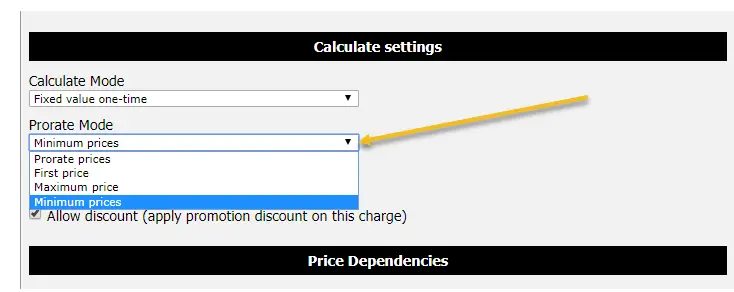
Season rates calculation mode dropdown in Car Rental Solutions
Screenshot: select Prorate Mode (Prorate, First, Minimum, Maximum). Click to zoom.

FAQ

What is season rate calculation?
It’s the rule that determines how a quote is calculated when a reservation crosses multiple seasonal price periods. For example: low season → high season in a single booking.
Which calculation mode should I use?
Prorate is the most balanced and easiest to explain. First Price is best when policy is “price based on pickup date.” Minimum is best for promotional strategies. Maximum is best to protect peak-season revenue.
Does this apply to daily, weekly, and monthly rates?
Yes—your seasonal pricing policy applies consistently across rate types depending on your configuration.

Want to see it in your workflow?

Book a walkthrough or start a 14-day free trial to test seasonal pricing with real quotes, reservations, and contracts.