
Car Rental Rate Code Promotions
Create targeted promotions for corporate accounts, travel agencies, partners, or special events. Set a date range for the offer. Choose where the offer will be available, such as by location, vehicle type, or affiliate website. Renters can enter the Rate Code on the website reservation form.
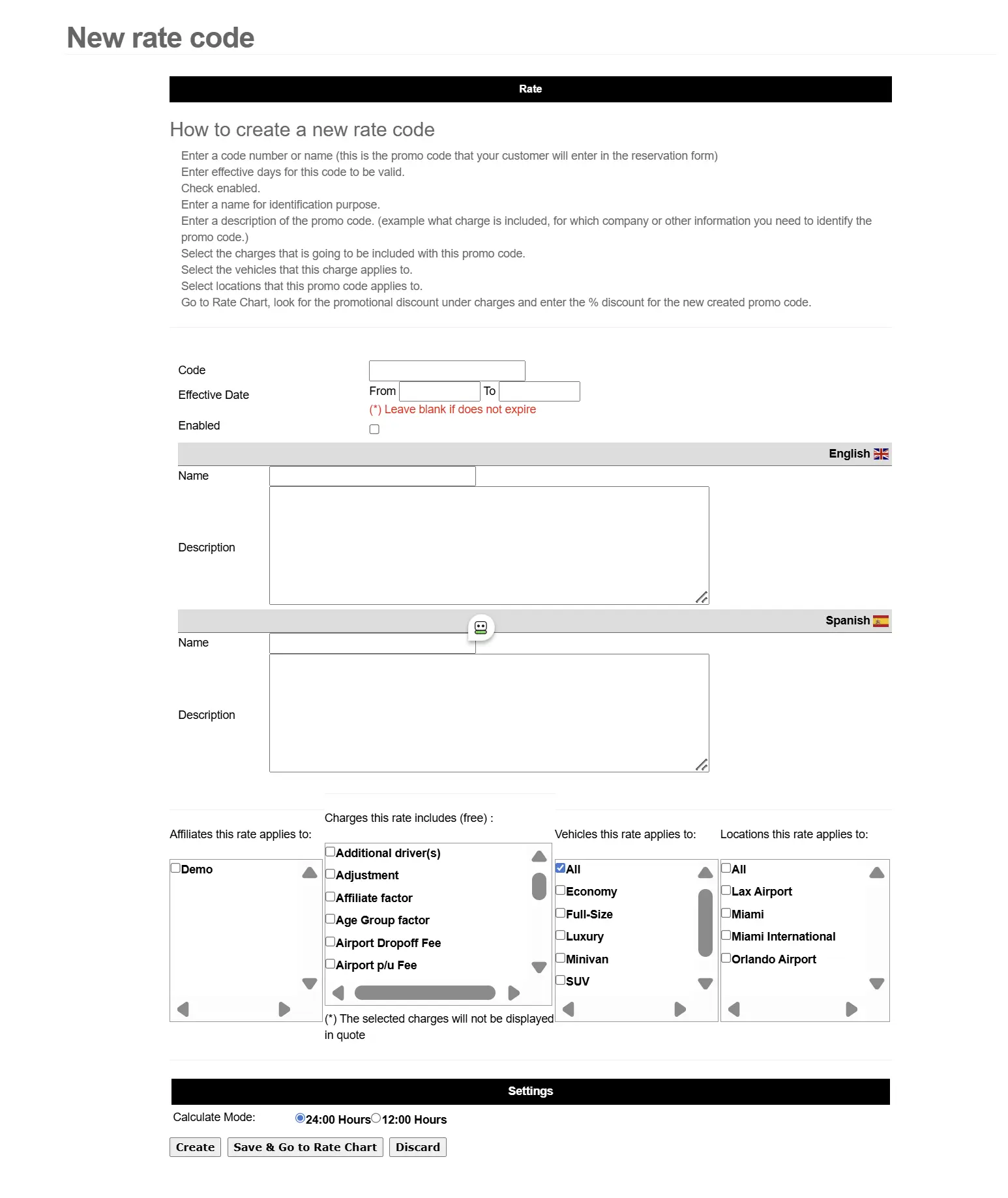
Rate Code Screen Overview
Inside the CRS Marketing section, Rate Codes let you build promotions that are more detailed than coupons— ideal for partner offers and special event campaigns.
- Targeted campaigns: corporate, travel agents, affiliates, or internal offers.
- Flexible validity: set a date range (like an event weekend) or leave it active with “never expire.”
- Website entry: renters enter the code on the reservation form and the quote displays the adjusted price automatically.
Example campaign: “Boat Show Weekend” rate code valid February 11–15, 2026, available at the Miami location.
How Rate Codes Work
Build the promotion once in the control panel, then share it with the right audience (partners, affiliates, corporate, event campaigns).
Create the Rate Code
Name the code, choose percent or fixed discount, and set an effective date range (or never expire).
Choose Where It Applies
Apply the code to all or one affiliate website/channel and add eligibility rules (branch/vehicle options as configured).
Share + Track Results
Promote with banners, partners, and campaigns. Renters enter the code and the system applies it automatically on the quote.
Coupon Code vs. Rate Code
Use coupons for quick public promos, and Rate Codes for detailed, targeted offers and tracked channels.
Coupon Code
A simple and quick way to add a % or amount discount with a valid-thru date.
- Great for public promos and banner offers
- Valid-thru date for quick campaigns
- Easy for customers to find online and apply
Sample: “Save 30% – Valid thru February 15 – Enter code: save$30”
Rate Code
More detailed promotions with an effective date range (or never expire) and optional channel/website targeting.
- Perfect for partners, corporate, affiliates, and event offers
- Date range or never-expire option
- Can be applied to all or one affiliate website/channel (as configured)
- May include extra benefits tied to the code
Sample: “Boat Show Weekend (Feb 11–15, 2026) – Enter Rate Code: save$30”
Rate Codes FAQ
Quick answers about Rate Code promotions in the CRS Marketing module.
- Can a Rate Code expire?
- Yes. Set an effective date range (for seasonal or event promos) or choose a never-expire option, depending on your setup.
- Where do renters enter the Rate Code?
- On the agency website reservation form (Rate Code field). When valid, the quote displays the discounted/adjusted price automatically.
- Can I limit the Rate Code to a specific website or partner channel?
- Yes. Rate Codes can be applied to all or only one affiliate website/channel (as configured), which makes partner tracking easier.
- Can Rate Codes include extra benefits?
- Yes. In addition to the discount, you can include extra benefits with the code (based on your configuration and promotion rules).