
Car Rental Discount Coupon Codes
Generate car rental coupon codes that customers can enter on your website’s booking form or provide by phone to receive a discount. You have the option to set expiration dates, select either percentage-based or fixed amount discounts, and tailor promotions according to specific branches and vehicle types.
Coupon Screen
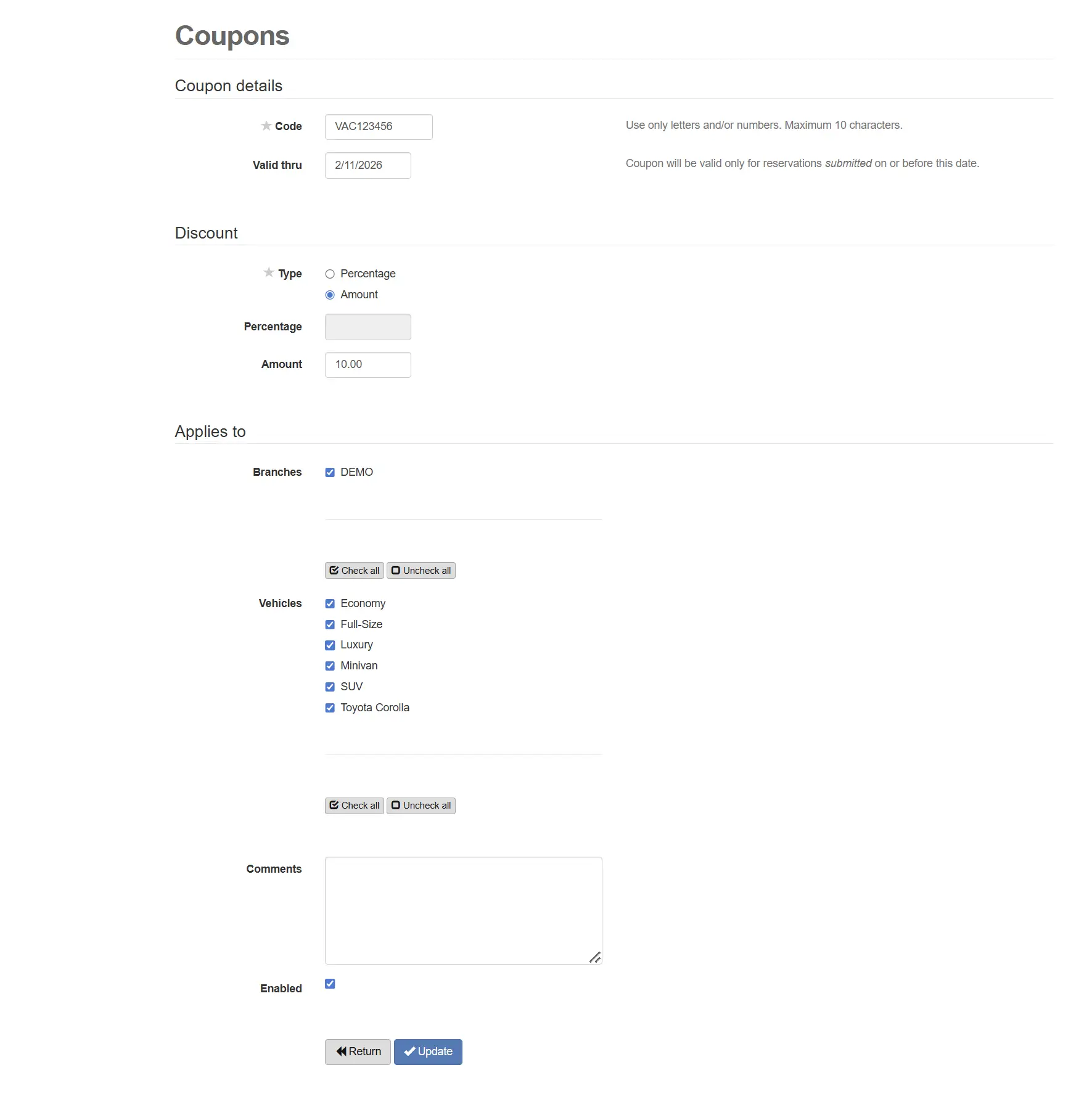
The Coupons screen is where your agency creates and manages promotional discount codes. It’s designed for quick setup: define the code and expiration, pick the discount type, and choose where the coupon applies.
- Coupon details: code + expiration date to control promo timing.
- Discount: choose percentage or amount depending on your campaign.
- Applies to: select branches and vehicles included in the promotion.
- Operational control: add comments and enable/disable as needed.
Pro tip: Create a dedicated landing page on the agency website that explains the coupon and includes the code—great for banners, email, and partner promotions.
How Coupons Work
Create a coupon once, then let renters apply it online (or provide it by phone) to receive the discount.
Create the Coupon
Name it, set the code and expiration date, then choose percentage or fixed amount discounts.
Publish & Promote
Use banners, email campaigns, social posts, partners, and landing pages to share the coupon.
Discount Applies to the Quote
When renters enter the coupon on the website, the quote displays the discounted price (if eligible).
Online Promotions + Phone Quotes
Coupons aren’t only for online reservations. If a customer finds a coupon code online, they can call the agency, provide the valid coupon, and request a quote with the promotion applied.
- Website: renter enters the coupon code during the booking flow.
- Phone / counter: staff can apply the coupon when creating a quote or reservation (based on workflow and configuration).
- Availability protection: the system tracks inventory automatically to reduce conflicts and double-bookings.
Marketing ideas agencies use
Coupons become more effective when they’re promoted consistently:
- Homepage banner + “Book Now” CTA
- Landing page dedicated to the coupon
- Email campaign to past renters
- Partner promos (hotels, travel agents, local businesses)
- Social posts during slower dates
Coupons FAQ
Quick answers about coupon promotions in the Marketing module.
- Where do renters enter the coupon code?
- On the reservation form on the agency’s website. If eligible, the quote shows the discounted price automatically.
- Can a coupon be used when a customer calls for a quote?
- Yes. If a customer finds a coupon online, they can call the agency, provide the code, and request a discounted quote.
- What discount types are supported?
- You can choose either a percentage discount or a fixed amount discount, and set a “Valid thru” expiration date.
- Can I apply a coupon to multiple branches and vehicles?
- Yes. Coupons can be active for one or multiple branches, and for any vehicles included in the promotion.
- Does the software help prevent overbooking when running promotions?
- Yes. Availability is tracked automatically, helping agencies avoid conflicts while managing online and offline reservations.
- Can agencies create banners or landing pages for coupon promotions?
- Yes. Agencies can create promotional materials and publish a landing page containing the coupon code information.
Want to see this inside the software?
Book a demo and we’ll show how coupons connect to the reservation form, availability, and reporting.
Book a Live Demo View All Features
Prefer email? Contact us here.